QuicklyStart
This is a quick start guide to show users what mdapy can do and how it should be implemented, for more specific information check out the API in the documentation.
Import corresponding packages
[1]:
import mdapy as mp
import numpy as np
import os
mp.init() # Run on CPU
[Taichi] version 1.7.0, llvm 15.0.1, commit 2fd24490, win, python 3.8.0
[Taichi] Starting on arch=x64
[2]:
mp.__version__
[2]:
'0.10.7'
Generate a System class from a dump file, which can be found in example folder and come from the Supplementary materials of this paper.
[3]:
system = mp.System('../../../example/CoCuFeNiPd-4M.dump')
Check the data of System.
[4]:
system
[4]:
Filename: ../../../example/CoCuFeNiPd-4M.dump
Atom Number: 8788
Simulation Box:
[[47.36159615  0.          0.        ]
 [ 0.         47.46541884  0.        ]
 [ 0.          0.         47.46849764]
 [-1.18079807 -1.23270942 -1.23424882]]
TimeStep: 0
Boundary: [1, 1, 1]
Particle Information:
shape: (8_788, 5)
┌──────┬──────┬───────────┬───────────┬───────────┐
│ id   ┆ type ┆ x         ┆ y         ┆ z         │
│ ---  ┆ ---  ┆ ---       ┆ ---       ┆ ---       │
│ i64  ┆ i64  ┆ f64       ┆ f64       ┆ f64       │
╞══════╪══════╪═══════════╪═══════════╪═══════════╡
│ 1    ┆ 2    ┆ 0.006118  ┆ -0.310917 ┆ -0.345241 │
│ 2    ┆ 4    ┆ 1.9019    ┆ -0.292456 ┆ 1.48488   │
│ 3    ┆ 3    ┆ -0.015641 ┆ 1.58432   ┆ 1.43129   │
│ 4    ┆ 5    ┆ 1.86237   ┆ 1.51117   ┆ -0.372278 │
│ 5    ┆ 5    ┆ 3.79257   ┆ -0.331891 ┆ -0.37583  │
│ …    ┆ …    ┆ …         ┆ …         ┆ …         │
│ 8784 ┆ 3    ┆ 41.5595   ┆ 45.481    ┆ 43.4996   │
│ 8785 ┆ 4    ┆ 43.4575   ┆ 43.7371   ┆ 43.6083   │
│ 8786 ┆ 4    ┆ 45.3771   ┆ 43.7577   ┆ 45.2727   │
│ 8787 ┆ 4    ┆ 43.4552   ┆ 45.4854   ┆ 45.2825   │
│ 8788 ┆ 1    ┆ 45.3919   ┆ 45.4009   ┆ 43.4999   │
└──────┴──────┴───────────┴───────────┴───────────┘
[5]:
system.data.head()
[5]:
shape: (5, 5)
| id | type | x | y | z |
|---|---|---|---|---|
| i64 | i64 | f64 | f64 | f64 |
| 1 | 2 | 0.006118 | -0.310917 | -0.345241 |
| 2 | 4 | 1.9019 | -0.292456 | 1.48488 |
| 3 | 3 | -0.015641 | 1.58432 | 1.43129 |
| 4 | 5 | 1.86237 | 1.51117 | -0.372278 |
| 5 | 5 | 3.79257 | -0.331891 | -0.37583 |
Calculate the average entropy fingerprint.
[6]:
system.cal_atomic_entropy(rc=3.6*1.4, sigma=0.2, compute_average=True, average_rc=3.6*0.9)
Calculate the CSP.
[7]:
system.cal_centro_symmetry_parameter()
Calculate the CNA pattern.
[8]:
system.cal_common_neighbor_analysis(3.6*0.8536)
Calculate the Voronoi volume.
[9]:
system.cal_voronoi_volume()
Check the calculated results.
[10]:
system.data.head()
[10]:
shape: (5, 12)
| id | type | x | y | z | atomic_entropy | ave_atomic_entropy | csp | cna | voronoi_volume | voronoi_number | cavity_radius |
|---|---|---|---|---|---|---|---|---|---|---|---|
| i64 | i64 | f64 | f64 | f64 | f64 | f64 | f64 | i32 | f64 | i32 | f64 |
| 1 | 2 | 0.006118 | -0.310917 | -0.345241 | -5.997978 | -6.469179 | 0.100697 | 1 | 12.68101 | 15 | 3.675684 |
| 2 | 4 | 1.9019 | -0.292456 | 1.48488 | -6.640982 | -6.677862 | 0.139544 | 1 | 12.012947 | 14 | 3.581766 |
| 3 | 3 | -0.015641 | 1.58432 | 1.43129 | -6.821837 | -6.666713 | 0.094929 | 1 | 12.197214 | 12 | 3.674408 |
| 4 | 5 | 1.86237 | 1.51117 | -0.372278 | -6.95832 | -6.940526 | 0.072999 | 1 | 12.900968 | 15 | 3.713117 |
| 5 | 5 | 3.79257 | -0.331891 | -0.37583 | -6.679066 | -6.846047 | 0.046358 | 1 | 12.400861 | 14 | 3.645415 |
Check the cutoff distance now.
[11]:
system.rc
[11]:
5.04
Neighbor atom index of atom 0 withing the cutoff distance.
[12]:
system.verlet_list[0][system.verlet_list[0]>-1]
[12]:
array([ 896, 8678,  897, 1009,    2, 7777,    3,    1,  110,  109, 7779,
       7885, 7782, 7785, 7778, 8677, 7776, 1012, 1010, 8683, 1008, 1007,
        902,  901,  899, 8785, 8787,  895,  894,  115,  113,  111, 7887,
       7886,  108,   10,    9,    7,    6,    5,    4, 8676, 8786, 7890])
Corresponding distance from atom 0 to its neighbor atoms.
[13]:
system.distance_list[0][system.verlet_list[0]>-1]
[13]:
array([2.51207536, 2.57315662, 2.5790717 , 2.58034708, 2.59777966,
       2.60048908, 2.60123122, 2.63508509, 2.63799678, 2.64905374,
       2.72325745, 2.75477797, 4.61796981, 4.39168494, 4.7209429 ,
       4.56321863, 3.89905168, 4.59982446, 4.55429458, 4.32684229,
       4.31587082, 5.02071962, 4.39625619, 4.94515597, 4.54722966,
       4.35032952, 4.48415811, 4.33703624, 3.40006539, 4.52692729,
       4.59187952, 4.58003206, 4.66009997, 4.7530261 , 3.73204146,
       4.42655427, 3.47691914, 4.43249288, 3.67048701, 4.59684361,
       3.78663373, 4.28528331, 4.63487348, 4.59095292])
Validate the distance between atom 0 and atom 896.
[14]:
system.atom_distance(0, 896)
[14]:
2.5120753608164965
Save the results to the disk.
[15]:
system.write_dump()
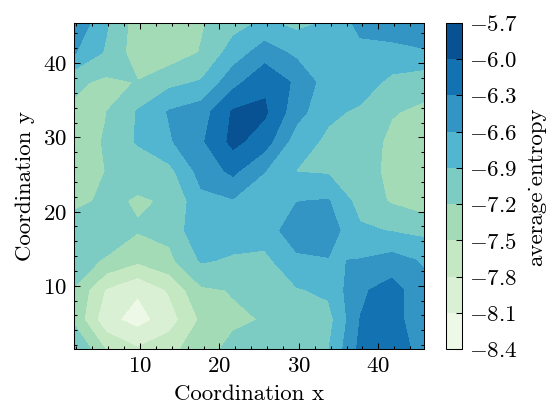
Do the spatial binning of entropy along xy plane.
[16]:
system.spatial_binning('xy', 'ave_atomic_entropy', 4.)
Binning coordinations.
[17]:
system.Binning.coor
[17]:
{'x': array([ 1.709397,  5.709397,  9.709397, 13.709397, 17.709397, 21.709397,
        25.709397, 29.709397, 33.709397, 37.709397, 41.709397, 45.709397]),
 'y': array([ 1.439891,  5.439891,  9.439891, 13.439891, 17.439891, 21.439891,
        25.439891, 29.439891, 33.439891, 37.439891, 41.439891, 45.439891])}
Plot the binning results.
[18]:
fig, ax = system.Binning.plot(value_label='average_entropy')
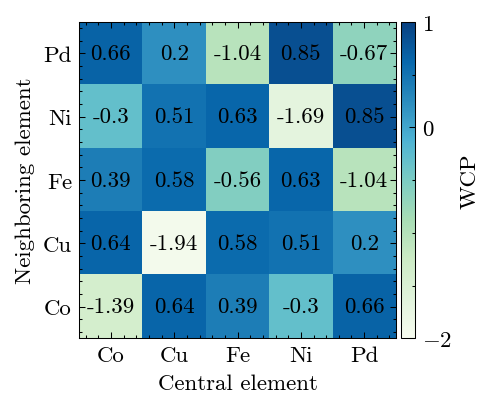
Calculate the WCP to reveal the short-range order in alloy.
[19]:
system.cal_warren_cowley_parameter()
Results show high SRO degree.
[20]:
fig, ax = system.WarrenCowleyParameter.plot(['Co', 'Cu', 'Fe', 'Ni', 'Pd'])
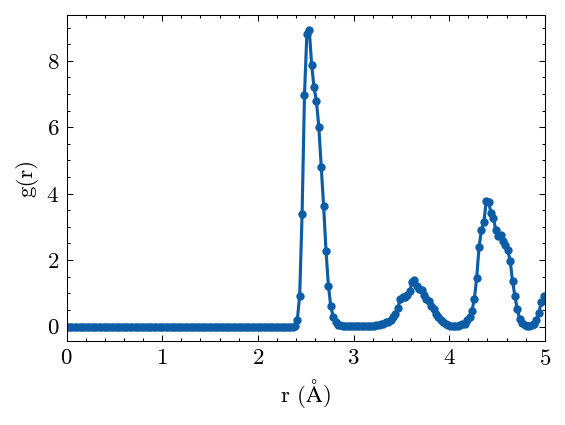
Calculate the radiul distribution function (RDF).
[21]:
system.cal_pair_distribution()
Plot the RDF results.
[22]:
fig, ax = system.PairDistribution.plot()
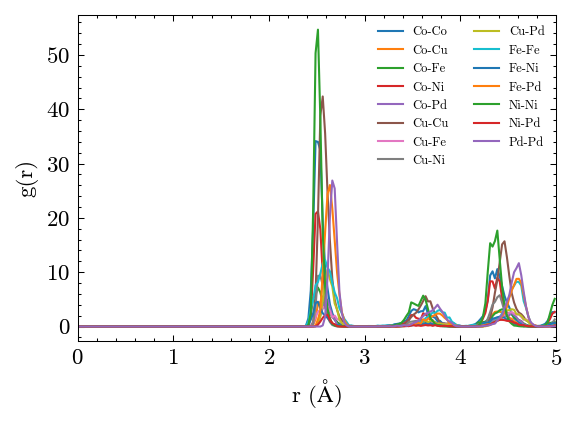
Plot the partial RDF results.
[23]:
fig, ax = system.PairDistribution.plot_partial(['Co', 'Cu', 'Fe', 'Ni', 'Pd'])
One can save the figure easily.
[24]:
fig.savefig('rdf.png', dpi=300)
os.remove('rdf.png') # Here just remove the saved figure.
Analyze the atomic trajectories
Generate a random walk trajectories.
[25]:
Nframe, Nparticles = 200, 1000
pos_list = np.cumsum(
    np.random.choice([-1.0, 1.0], size=(Nframe, Nparticles, 3)), axis=0
)*np.sqrt(2)
Calculate the mean squared displacement (MSD).
[26]:
MSD = mp.MeanSquaredDisplacement(pos_list=pos_list, mode="windows")
MSD.compute()
Check the MSD results.
[27]:
MSD.msd[:10]
[27]:
array([-1.91164418e-13,  6.00000000e+00,  1.19898990e+01,  1.79689746e+01,
        2.39582857e+01,  2.99463385e+01,  3.59534433e+01,  4.19486010e+01,
        4.79263750e+01,  5.38981361e+01])
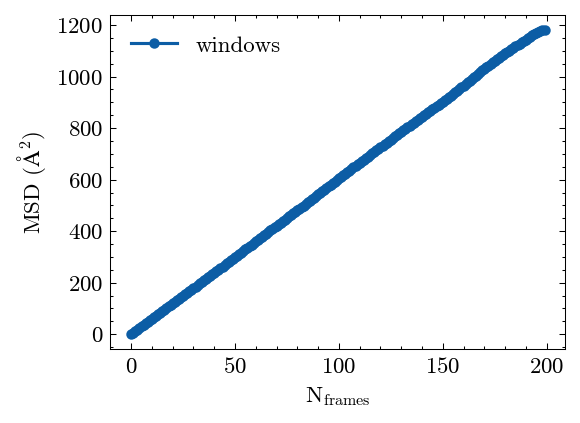
Plot the MSD results.
[28]:
fig, ax = MSD.plot()
Calculate the Lindemann index.
[29]:
LDML = mp.LindemannParameter(pos_list)
LDML.compute()
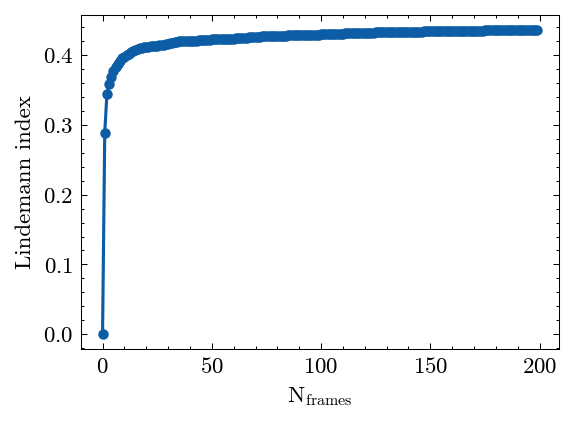
Plot the Lindemann index results.
[30]:
fig, ax = LDML.plot()
Analyze EAM potential.
Generate an average EAM potential is simple.
[31]:
EAMave = mp.EAMAverage('../../../example/CoNiFeAlCu.eam.alloy', [0.2]*5)
Read this average potential file.
[32]:
potential = mp.EAM('./CoNiFeAlCu.average.eam.alloy')
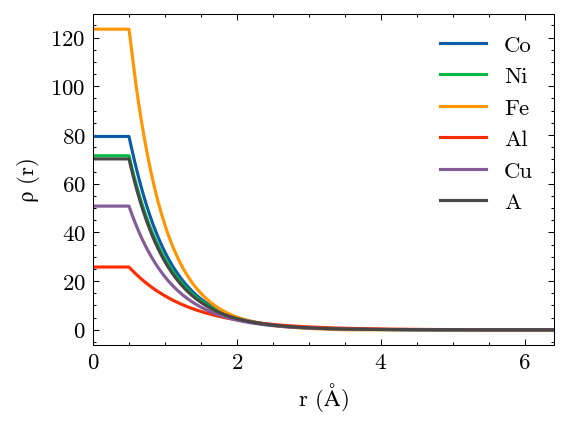
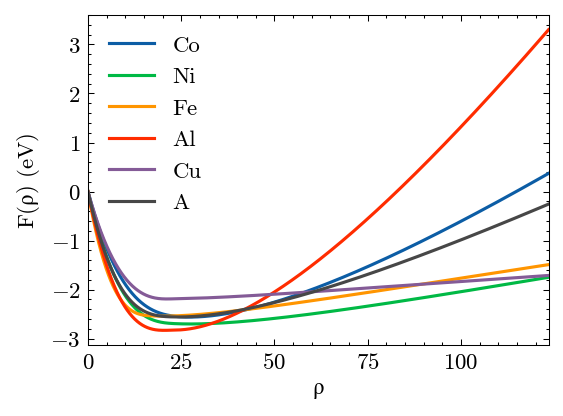
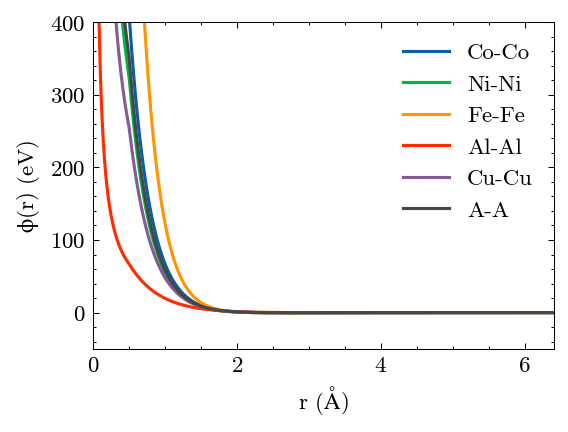
Plot the results. A is the virtual element.
[33]:
potential.plot()
[34]:
os.remove('CoNiFeAlCu.average.eam.alloy') # Here just remove this average EAM file.